Platform

Signals in. Revenue decisions out.

PravRaha is organised as a 7-stage intelligence loop plus an execution layer, not a feature list. Each intelligence stage below states what it does, what it reads, what you learn from it, and what that lets you decide. The records that feed the loop are sales intelligence: who exists, who fits, and how to reach them.

Intelligence Loop
7-stage intelligence loop + execution layer
  1. 01
    Signal
  2. 02
    Intelligence
  3. 03
    Prediction
  4. 04
    Timing
  5. 05
    Decision-maker
  6. 06
    Action
  7. 07
    Revenue
revenue → feedback → re-score → signal  // every cycle makes the next one smarter
Execution Layer
Execution

Execution is the activation mechanism that turns the recommended action into an actual outbound action.

Intelligence loop

Seven stages, each with a job.

Signal to revenue, as one loop. Execution is the layer that follows: the activation mechanism, not an eighth stage.

01

Market signals

read the guide →
What it does
Watches your addressable market for companies crossing the thresholds in your ICP.
What it reads
Job postings, funding events, technology changes, leadership transitions, company intelligence from multiple sources.
What you learn
Which accounts changed this week, and what changed.
What it lets you decide
Which accounts enter the working set, and which drop out of it.
02

Account intelligence

read the guide →
What it does
Builds the account file before anyone opens the account: org, stack, news, competitive context.
What it reads
Company intelligence and technographics, plus the triggering signal.
What you learn
What the change means for this specific company.
What it lets you decide
Whether the situation matches a problem you solve, and how strong the evidence is.
03

Buyer intelligence

read the guide →
What it does
Identifies the people attached to the function the signal points at.
What it reads
Org data, role changes, reporting lines.
What you learn
Who sits where, and who is new.
What it lets you decide
Which function to engage, rather than which title to search for.
04

Buying context

read the guide →
What it does
Holds what you sell, how you differ and who you compete with, so messaging is grounded on your product rather than a template.
What it reads
The Product-Context screen in the app.
What you learn
How your offer maps to the situation at the account.
What it lets you decide
The angle worth taking with this account.
05

Revenue timing

read the guide →
What it does
Reads the recency and sequence of events to indicate where conditions may be changing.
What it reads
Signal type, how recently it happened, and what else happened around it.
What you learn
Which accounts look live now against which look early.
What it lets you decide
Where a person’s attention is worth spending this week.
06

Decision-maker intelligence

read the guide →
What it does
Maps the buying committee: who holds budget, who evaluates, who lives with the problem.
What it reads
The account file, the function in motion, role and tenure data.
What you learn
Who decides and who can block.
What it lets you decide
Which threads to open, and who should own each one.
07

Next best action

read the guide →
What it does
Turns the situation into a specific action, drafted against the trigger that created it.
What it reads
The trigger, the account file, the committee role of each recipient.
What you learn
What to say, to whom, in what order.
What it lets you decide
Which drafted message your team reviews and approves before it is sent.
In the product

What the workflow looks like on screen.

Captures from the PravRaha GTM Controller, cropped to remove browser chrome. Nothing inside the product UI has been edited.

Stage 01 · where the thresholds come from
PravRaha GTM Controller
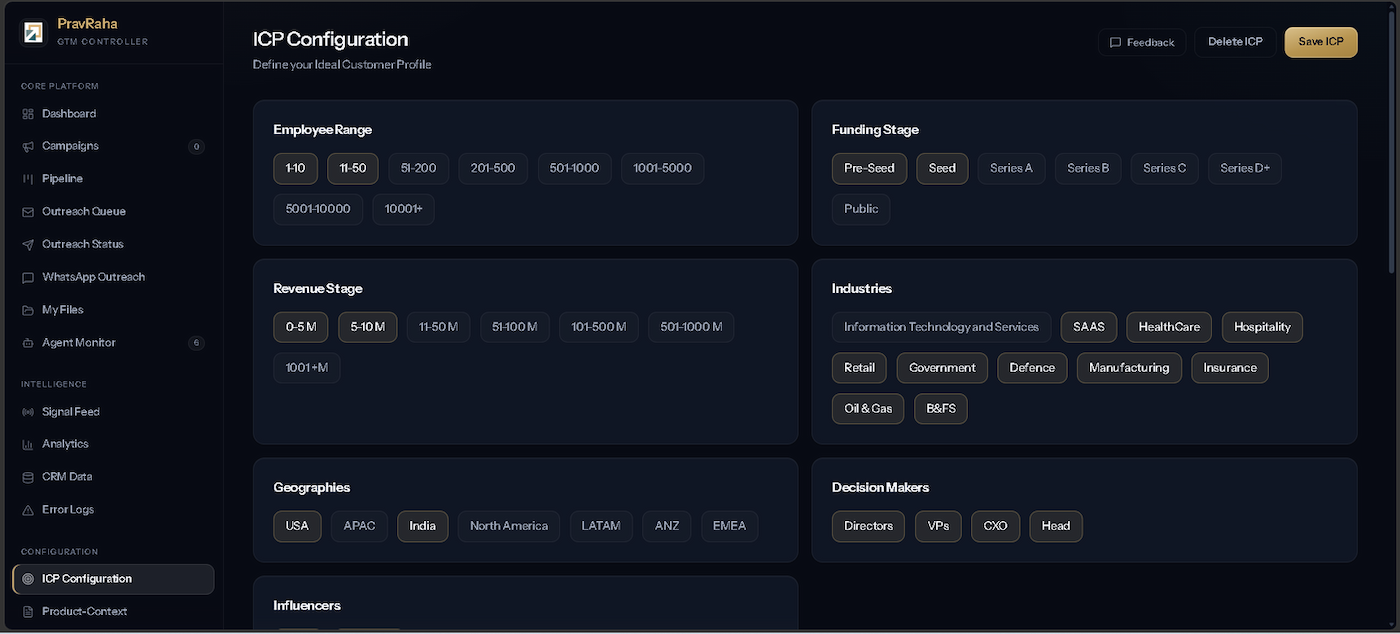
ICP Configuration: employee range, funding stage, revenue stage, industries, geographies and decision-maker levels
The ICP is stored as a model the agents run against, so the same definition drives every campaign.
Stages 01 to 07 · what comes out the other end
PravRaha GTM Controller
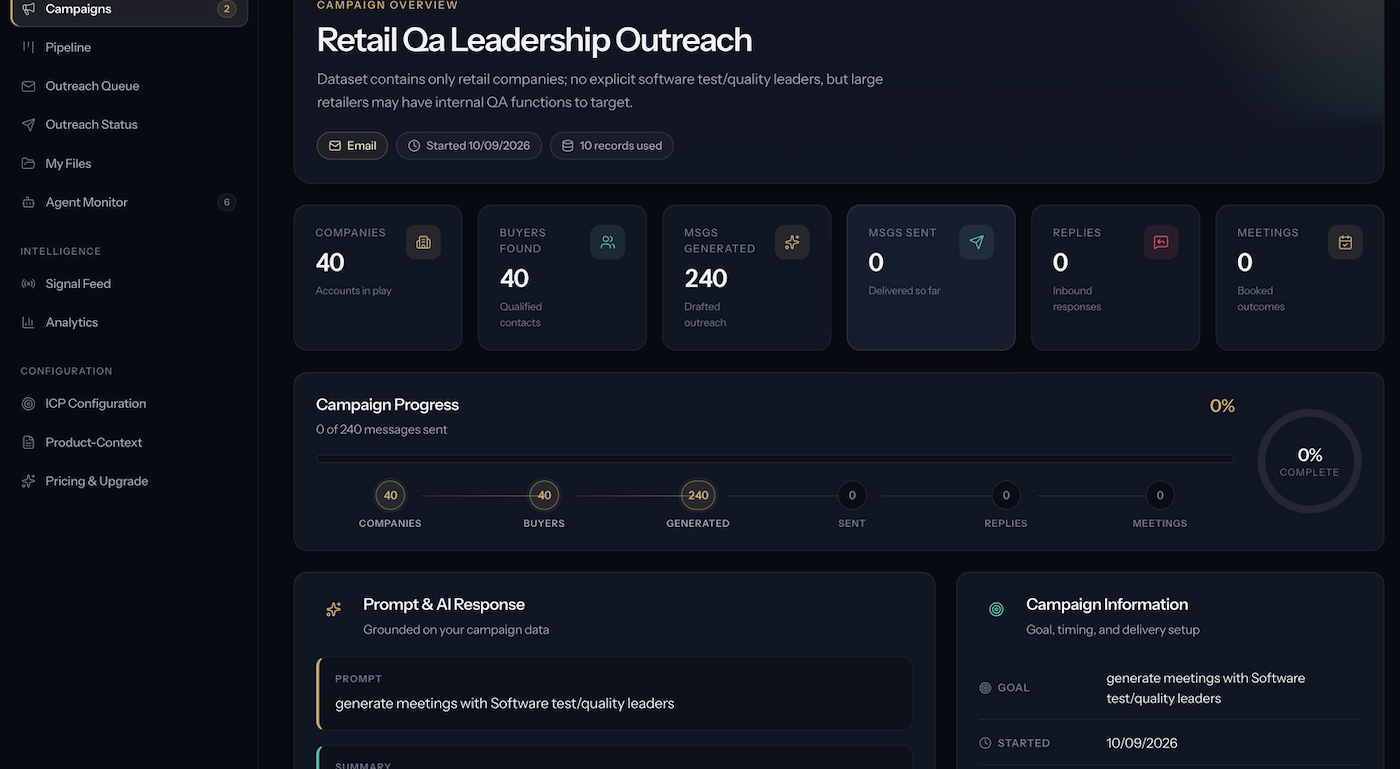
Campaign overview with companies, buyers found, messages generated, and the AI response noting a gap in the dataset
A campaign after generation and before sending. The summary reports that the dataset held no explicit software test or quality leaders, rather than forcing a match that was not there.
Components

Six agents, each owning one part of the loop.

They are components of the workflow above, not the product itself. The Agent Monitor in the app tracks all six.

01

Market Scanner

Identifies relevant market movement against your ICP.

02

Account Research

Assembles the account context behind that movement.

03

Buyer Discovery

Identifies the people who matter inside the account.

04

Messaging

Converts context into a relevant message rather than a template.

05

Campaign Execution

Queues approved outreach for sending from the connected channels and records the outcome.

06

Pipeline Optimizer

Reads outcomes and adjusts what gets prioritised next.

Execution layer

Activation, not another stage.

Execution is the activation mechanism that turns the recommended action into an actual outbound action.

Layer

Execution

read the guide →
What it does
Sends the outreach your team has approved, through your own mailboxes and channels, and records what came back.
What it reads
Connected Gmail, Microsoft or SMTP accounts, WhatsApp, and your CRM.
What you learn
What was sent, what replied, what booked.
What it lets you decide
What the next cycle should weight differently.

It sends from your infrastructure, not ours.

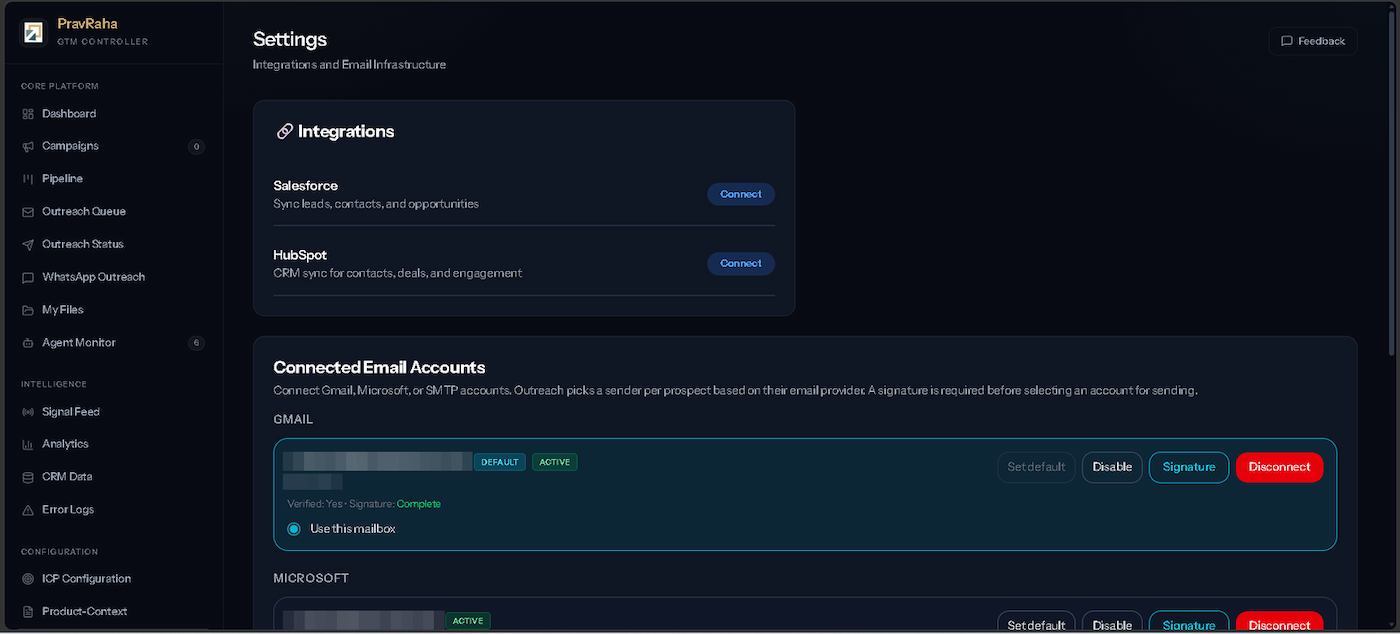
Connect Gmail, Microsoft or SMTP. PravRaha drafts the message; a person on your team reviews and approves it before anything is sent. A signature is required before an account can send. Salesforce and HubSpot connect from the same screen, and WhatsApp is available as a channel alongside email.

The intelligence loop recommends the action and drafts the message; your team approves it, and the channel is how it leaves the building.

Execution layer · connected accounts
PravRaha GTM Controller
Settings screen showing Salesforce and HubSpot connectors and connected Gmail and Microsoft sending accounts
Email addresses are pixelated for privacy. Nothing else in the capture is altered.
FAQ

How the platform thinks.

PravRaha analyzes multiple B2B buying signals, company intelligence, buyer intelligence, intent data, engagement signals, and market changes to identify accounts with stronger purchase potential.

No. PravRaha does not claim a validated buying date and does not label accounts with dated windows. It reads how recently a business event happened and what else happened around it, shows which accounts appear to be moving, and explains why, so your team can decide where attention is worth spending.

AI revenue intelligence uses artificial intelligence to analyze business and buyer signals and identify potential revenue opportunities. PravRaha applies AI to account prioritization, buyer intent, timing context, and next-best-action recommendations.

Next step

See which accounts are moving.

Point PravRaha at your market and work from movement instead of a filtered list. If you would rather walk through it with us first, a Pipeline Review is 45 minutes on your ICP and your current stack.

Built from Ranchi. Built for the world.